Wednesday, January 29, 2014

Motorola being sold again - to Lenovo

Such a shame the sale of Motorola is going through in the next few hours, Google have really helped Motorola make cracking handsets in the X and the G. 

Motorola have been a bit of a burden on Google, the sale will see a huge loss with the patent book not being worth much in the eyes of the court and $3billion is small change on the investment which also saw Motorola stay in the red for the last few years; not a penny made in profit.

I cant help but think that Lenovo will make a shed load of people redundant and the brand will become a budget OEM that will fade into obscurity. 

Lenovo themselves have been kicked about like a hot potato nobody wants, and seems like they will smoother Motorola but I could be wrong.  

For the consumer this could see the end of the new improved Motorola as we know them, which is a massive loss to all things Android - I for one will avoid Moto if this goes though.


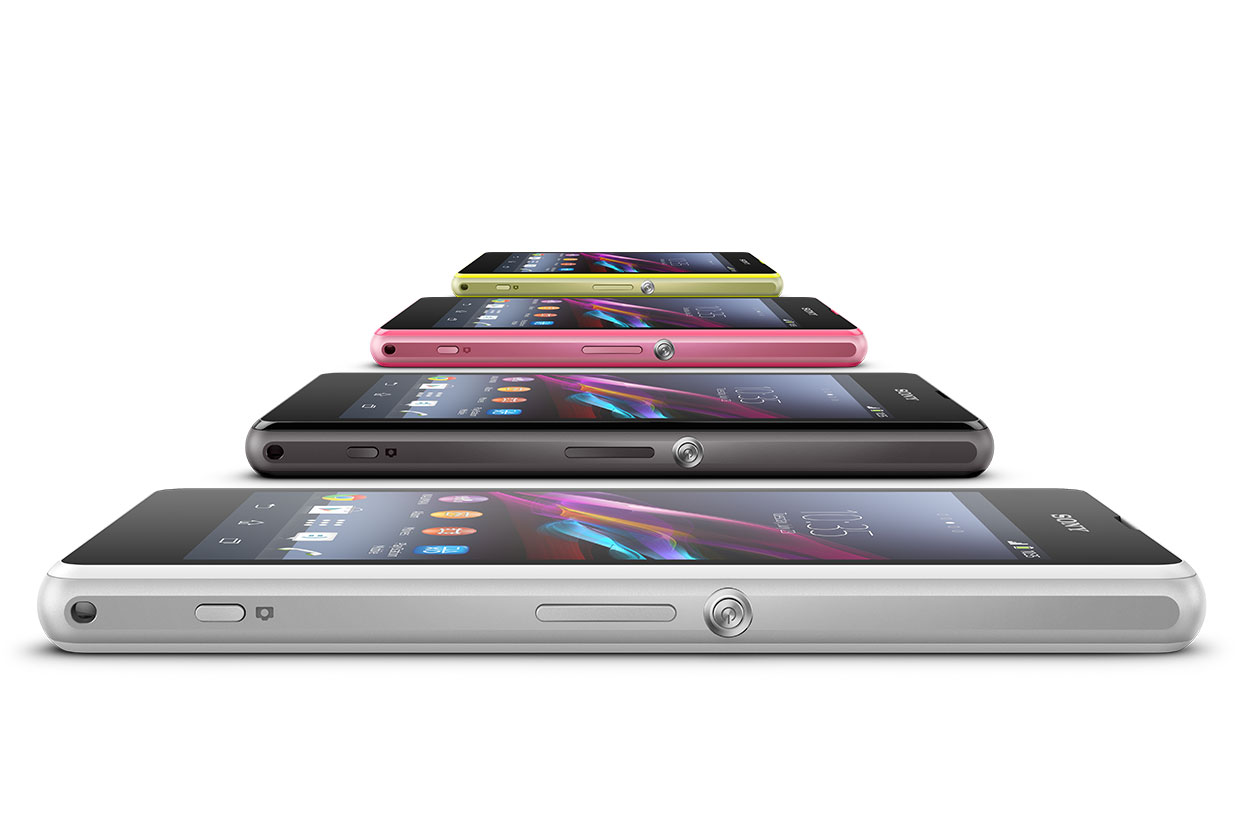
Sony Z1 Compact actually better than its big brother ? You Bet !

When I took a look at the Z1 late last year I gave it a bit of a rough time, you can read all about that on our blog posts after living with Sonys flagship for a few weeks.

Problems I found with the Z1 were less than stella battery life, camera which under delivered on its promise (although by no means a poor camera, its actually very good) and I had a few question marks around its size, those extra bezels were just a leap too far for me - the Z1 felt awkward in the pocket as a result. 

So you can understand why I took note when Sony announced the Compact was on its way. 

Same old, Same old new stuff

Pretty much all the hardware that's in the Z1 is in the compact minus the screen and the battery, of which one drains the other so I was quite happy to see that battery draining screen gone. The chip set has been pretty much left untouched as memory size has too, of course that waterproof body is still in full effect. One thing that also came across is those over-sized bezels, there is slightly less of them but still they are big.

To cut to the chase, the experience is pretty much exactly the same as the Z1 - the UI skin feels the same, the camera feels the same; with a few tweaks on low noise which is most welcome, the premium feel is still there in that sexy body.

The screen doesn't feel like its been dumbed down in size and quality, the display is still rich and in fact has better viewing angles then the Z1 despite its lower dpi and 720p res spec.

One of the big selling points of this phone is the battery, for a "mini" its way out in front in its class, and here is where it beats its big brother by a country mile. While I ran our own 'not so lab tests', the Z1C managed an average of 11 hours of bashing the battery with YouTube, e-mail, some browsing, and social media activity. On screen time broke 6+ hours easily each time when I was active with the handset. 

Comparing the Z1 to the Z1C, I can honestly say I would pick up the Compact every time. Its practical, the camera is slightly better and there is no looking for the power supply within 4 hours of using the active screen, there have been some bloggers claim silly numbers with the Z1 - oh it lasts me 7 hours etc, seriously thats the biggest load of BS I ever heard, and maybe they are on Sony's payroll. However the Z1C in part is something the Z1 should have been. Practical, fast and stylish and most of all actually last all day.

Sony have done very well making this less of a mini and they have been smart NOT to call it a mini, but a compact. Having all the same USP as its big brother is quite an achievement - the only issue I have is thinking is anyone going to make the mental leap of paying flagship prices for a compact ?! Maybe so.

This over view of the Z1 Compact is just that, the Sony rep kindly left it with me for a few days, so no long term until I get to have one full time.


Tuesday, January 28, 2014

Soul Fjord hits OUYA right NOW !

Yes at long last Soul Fjord has arrived on OUYA, send it to your OUYA if you cant get to the store here.


Soul Fjord is a rhythm based action game made exclusively for your OUYA console by the team at Airtight Games that brought you Quantum Conundrum. Become the legendary champion of funk, Magnus Jones, as he sets out for revenge and fights his way to Valhalla, the hottest club in the afterlife.

I must say this game is epic, a killer app for +OUYA maybe ? 

While playing this game I thought of how I could sum it up easily, think RPG PaPappa The Rappa - its the best I can do to be honest. 

Its free to play but lots of in app purchases, which you dont have to do but I guess on the later levels it might be handy to buy some "records" which can be used to purchase new items from the superfly guy selling his shizzle under his jacket. 


Get stronger WiFi using our handy guide


I often get asked how to get a stronger wifi signal with less interference and better range without buying new equipment.

In truth you probably already have the ability to do so with your current kit, it just needs a tweak, before you start with this guide I would highly recommend moving any 2.4Ghz handsets / cordless phones away from the router or wifi AP that you are using; Panasonic are the worst offenders for interfering with signal in the wifi spectrum but we will work round that, but best to move it if possible.

If you can use the 5Ghz band as well then do so, that's normally much much quieter although the range isn't as good so lets put that to one side and stick with good ole fashioned 2.4Ghz for now.

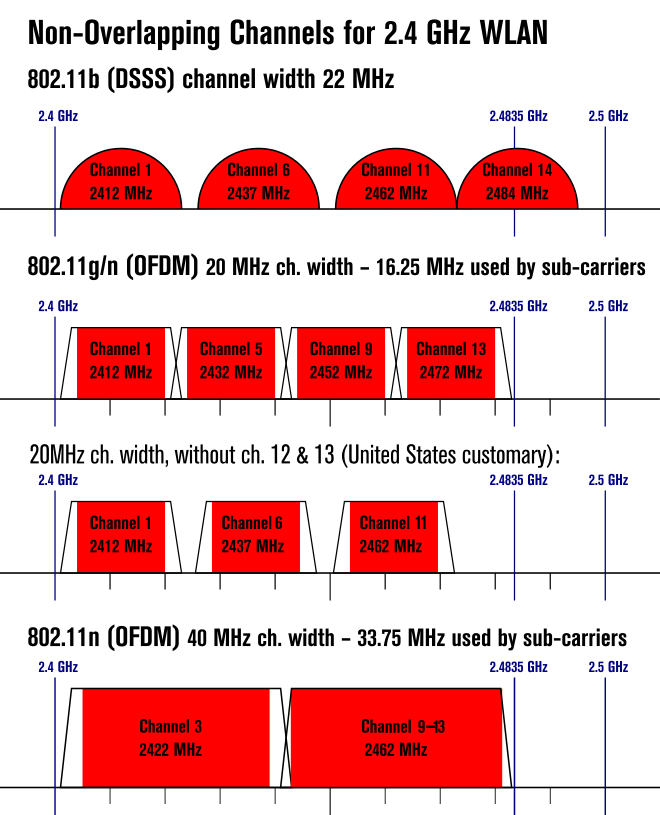
Its important to know the non overlapping channels of which there is an info graphic just here, more on channels later.

Here is a little cheat if you live in the US, some routers will ask you for your geographic location, if you say "US" you will loose the ability to use Channels 12,13 and 14. Those channels are not licensed in the US, if you use those channels (at your own risk) by fibbing to your router you will have 3 glorious quiet wifi band(s) to run around in which means better range and a stronger signal. In fact only Japan is licensed to use Channel 14 for now.

So how to scan for local wifi, using this process may disconnect you wifi to the local network so grab a small wifi card if you can otherwise its not essential and stick to using your handset as we have here.

Grab a copy of inSIDDer here http://www.inssider.com/ or use the Office product which is free to download here or from the Google Play store here and install it (we suggest using your handset if you don't want to pay for usage, and for testing this out without using your PC / Mac / Laptop whatever.)


Fig 1
Fire up the app and press the Networks item, you will be presented with a list of Wifi Channels locally (fig 1), the one you are connected to will have the green icon next to it. 

To optimize this network long press to tag with a blue star, this makes it easier to find in step two if the local area is "busy" with wifi.

Swipe left (fig 2) and you will see where the least number of APs are operating in, in this case using Channels 1 or 11 may improve my network as only 3 APs are using these channels. I can use channel 4 too (as you can see in fig 3)

Press the 2.4Ghz item on the right of the menu bar at the top (swipe left first) and you will now be given a list of all the wifi locally and their Channel footprint. As you can see in fig 3 there is allot of wifi on the same band as BT / Sky love to clog up the same channels without much of a care for others. Which is fine, let them have that, makes it easy for us to work around.

As you can see I have the only two wifi networks on their own channels without any interference from others. But I could improve things further, using channels 1/11 or 6


Fig 2
That is what you are looking to achieve. Log onto your router and change your channel to a channel which is clearer and less interference - in this case channel 4 (11 and 1 would also have been a good option as I said), and thus giving you a stronger, more reliable local Wifi. - all for free too. Remember to reconnect any 2.4Ghz devices post channel change as they will loose connectivity, such as printers or laptops, game consoles etc.

Once done remember to close the app down or it will be analyzing your wifi all day long, which zapps your battery down quickly. 

Anyway thats it, I hope you find this useful - if so leave a comment and let me know how you got on. 


Fig 3


Monday, January 27, 2014

More Nintendo going mobile rumors; demos on your phone

Seems like the Nintendo rumor snowball are now in full momentum. As we reported back in November on this very blog, see here. the chance of Nintendo going Android seems to be becoming closer to reality.

According to a Japanese Dr Serkan Toto a Japanese publication to the Nikkei reports Nintendo will release recorded game clips and playable demos on mobile devices intended to promote its games.

Dont expect to see Mario or any other of Nintendo's large IP on your handset to play for hours on end but you maybe getting a free level or a timed single play through for a few mins.

Nintendo would do well to start looking at other platforms for its IP like Sony is, Nintendo risk becoming stuck like Sega did before they jumped into the software business full time, their share price and Q4 earnings are tanking. So whats to give first ?!

Sunday, January 26, 2014

Massive MASHUP XBMC 1.4 update is here


For those with a device capable of running XBMC, there is a new pre-release for MASHUP available, its now version 1.4

To get the bag of treats into your XBMC system, then just add the source :-


HTTP ADDRESS HTTP://PRE.MASHUPXBMC.COM

UPDATE now its on HTTP://INSTALL.MASHUPXBMC.COM


Or watch the very helpful video bellow on how to add it, if you cant see it because of country restrictions then click here to watch on Vimeo


Mashup Pre Install from HackerMil on Vimeo.

Monday, January 20, 2014

Why some bloggers and "Tech" are just phoney


One thing I have noticed over the last 4-6 years, and I guess you have too, is the word Tech being bounced around a lot more than it used to. 

Tech was never used to describe a phone or a home computer even, but mostly used in the IT industry, a "Technie" was someone who provided 3rd level or beyond or worked in a data centre doing something like infrastructure support, either through the data network or for various hardware platforms; mostly not point and click Microsoft "Engineers" no marks. 

Roll on 6 years and now the interweb is awash with so called "Techies" that don't really fit into any of the a fore mentioned categories, yet they blog away (some even paid to do so, more on that shortly) with the contempt to use the word "Techie" or "Tech" - I'm very sorry but I rarely use that word here on this blog, for the reason that a phone just isnt Tech, or a tablet or anything handheld or the user that owns them. Now you could argue that installing a ROM or rooting a bootloader is technical, maybe it is but that's just one process, which is very well documented on the web anyway. So any idiot can fire up YouTube and copy the commands / process with minimal risk, even if they do mess things up the worst case is they mess up a handset costing £600. Hardly a big deal is it ? When a proper "Techie" has a blue chips company by the balls over the course of a hard weekend of highly risky process, which can be sued for millions of £££ if it goes wrong, the knowledge he / she has to have is what I call Technical.

Channel 5's The Gadget Show is a classic example of watering down a word to suit the masses of finger swipers who think that finding the WiFi button on a Samsung Android Camera is an epic win.  Please just stop already.

Then we get onto the bloggers who are paid to blog, this really gets my goat. Here is why, no its not jealousy, I don't want to be paid to blog. This blog is a side line to my larger career - which involves over 25yrs of IT from all sectors, clients, businesses (mostly in the enterprise) and all sorts of positions from freelance consulting to Subject Matter Expert. So why would I want to be paid to pick up a gadget and tell all about it of give my views on a sector which is fast paced. Well I don't want to, I want to keep IHAG as impartial as they come. Which makes the views cast here not subject to a corporate kick in the face if I dare to say the Sony Z1 does actually have crappy battery life when the screen is being used.

When money is involved credibility and impartial views are out the window, just pick up any newspaper that is part funded by some political party to get the gist. 

Also throw in the debacle last week of many bloggers "re-blogging" an eveleaks tweet all over the Googleverse that left many-a-blogger with egg on their faces, because the information that was 3rd hand was actually complete bollocks to begin with. 

I have tried to take this up with a few fellow bloggers which I have discovered do actually receive a payment for their reviews of a said item, many of them decided to throw the old - "Ah your spamming me" or "You are wrong because xyz" when discussing an item they just blogged about. Sure they can get paid and defend their views, that's their right to do so but their blog and subsequent reviews are just as phoney as the word "Tech".

Rant over !


Saturday, January 18, 2014

Why The Great Circle Debate Wasn't That Great

Empty Seats by Daniel Foster, Some Rights Reserved
Disclaimer: This piece is an op-Ed written by Peter G McDermott, and does not necessarily reflect the opinions or views of I Have a Gadget Blog.

This past week, +David Oldenburg and +Christine DeGraff hosted a debate about circles shared across the Google+ network. The debate featured +Shawn Manaher+Randy Hilarski+John Skeats and +Keith Bloemendaal. The debate last just over an hour and is available to view on YouTube.

Through watching the video, you can see that there were several comments by viewers throughout the presentation. During the presentation, all of the participants did a tremendous job of keeping their cool, presenting their ideas and contradicting opinions. However, I didn't leave the debate learning anything, or taking on a new perspective.

Debates are an opportunity to challenge the way people think. They are a forum to exchange very differing opinions in such ways that make people question their own beliefs. Unfortunately, the debate of shared circles was presented as only having two possible use cases: gaming the system, or providing unique, focused and curated groups of individuals.

I will be the first to admit, that at the beginning of Google+, shared circles were a necessary component of finding who to follow and growing an audience, especially for the "nobodies" out there like me. However, even then, circles were shared based on the active participation of users. Google+ers were looking for anyone to follow that logged in more than once a week to keep their stream hopping and discovering new and sometimes interesting things.

As the network grew and the prevalence of the Suggested Users List started to level out the acceleration of shared circles, an interesting thing happened: people started to develop communities within the community before we even had the Communities feature. I think the best example of this was the group of people that used public Hangouts on a regular basis. You probably know quite a few of them too: +matthew rappaport+Hermine Ngnomire+Robert Anderson and +Amanda Blain, just to name a few.

Over time, circles would continue to be shared by the "power" users to help new users find interesting people that posted on a regular basis. +Robert Scoble used them to help showcase bloggers, photographers and technology pundits. +Mike Elgan used them to experimenting with social-platform blogging (#BlogsofAugust) and others used them to share their treasured discoveries from months of platform use.

In the last year, the concept of "snowball" sharing has become common place. A small circle with well known power users would circulate around with the promise of inclusion if you took social action on the post (through +1, reshare or commenting). Users were encouraged to take the circle, add themselves, and reshare with their audiences.

It was easy for users with small audiences to fall prey to these circles because the incentive to grow their audience was so huge. With just a few simple clicks, they would somersault into a circle that would continue to snowball and grow in size. What these users didn't realize though, was that as the circle continued to grow in size, it would shrink in value and relevance. What everyone was left with were 100's of irrelevant circles and a bunch of schemes to continue the trend clogging up their stream. In frustration, many of them (I assume) stopped using Google+.

The reason the "Great Circle Debate" wasn't that great, is that we already know both sides of the debate. You can either carefully curate circles filled with people you closely follow, or you can participate in a snowball circle, where the only one to benefit is the person promising you loads of engagement and interaction.

+Mark Traphagen really nailed it this morning in talking about relevance and how your authority ranking trumps the number of people that follow you, or the amount of interaction you have on your posts. It's not about how much, how many or how often, but who's behind it.

If you want to chase numbers and make yourself sick of a network that can offer you endless opportunity, start a snowball. Heck, start an avalanche. Just remember, someone's going to get hurt.

Thursday, January 16, 2014

Will shortsighted lawmakers see Glass as a cash cow


Today's court case could decide the future of Glass being used by drivers worldwide not just in various states across the USA, the threat of a ban could destroy some fantastic applications / uses for Glass and I hope the courts are not shortsighted enough to impose a ban. 

Picture by Ryan Li
Instead of using a ban, it could in fact help drivers stay safe, even lower insurance premiums perhaps, and here is how.

Firstly the creation of an app than monitors blinks and the direction of your head, causing Glass to sound an audible alarm right into your head, we have seen something like this being made in the Glass community and I hope we see a full production sometimes soon. Great for those long drives when your concentration lets you down.

This also goes for speed too, knowing how fast you're travelling could help keep to the speed limit, regardless of the country and car you are driving. There are many GPS systems which have alerts for speed limits, but when they stop receiving updates the speed limits don't get updated either, Glass uses Google Maps which is refreshed for roadworks etc, and changes to speed on main roads, and I'm sure traffic is also being included soon too. Being alerted via the display as well as into your ear when you are speeding as well as going the correct way is vital to road safety. 

In some parts of the world dashboard cams help reduce car insurance, they record the last moments of your drive, maybe the last 10-30 seconds are recorded in a rolling basis. Not only does this assist in fast claim payouts in the event of a crash but it also could help in the event of someone performing a hit and run, recording vital information which could be pushed from your handset right to the insurance companies and police quickly. Glass could do the same and not only that but say if someone attempts a car jack, hit a panic button and the recording is sent quickly, police alerted. Just with a quick tap to the Glass the info is sent. 

These are just two I can think of, right off the top of my head, sure they are crudely thought out and I haven't put much process into these but hey I'm not a developer - what would be criminal is this kind of usage that allows us to be safer when driving, get us from A to B, keeps our car insurance lower, that would be killed off; just because a lawyer someplace wants to enforce a fine that makes local law makers money. 

As I have said many times on this blog, starving innovation for a quick buck doesnt help anyone. Most of all the misguided law makers that will see Glass as another way to milk a buck or 50 out of drivers. 

Friday, January 10, 2014

Unlock US/UK content on your PlayStation 3 / 4


We all like to watch TV and Movies, however using US services like HBO, FOX, Netflix or Amazon Prime can be problematic for the Brits, just as watching BBC iPlayer and Sky Go can for the Americans - even when you travel too. Dam those regional restrictions. 

Want to work round that ?

Great, although VPN isnt supported on most game consoles tablets there is another way, using SmartStream from StreamVia. 

SmartStream is StreamVia's latest and greatest invention for maximum streaming performance, say goodbye to buffering and watch in HD quality easily.

Due to the way SmartStream works you will not notice any slow-down of your internet connection, only the UK & USA sites that SmartStream supports are unlocked and all other local sites continue to work as normal. There is no software to install just a simple configuration change and then sign in to authorise your connection!
SmartStream also works on devices that would otherwise be complicated to connect to a traditional VPN service - such as games consoles, Internet TVs, media streamers etc - but it can also improve the streaming performance of regular devices, such as computers, phones, tablets etc, when compared to using a VPN.
So how do you get this good stuff, easy, click the StreamVia link on the right of the page and sign up for UK / US VPN, you will get SmartStream included in your package, unlike other vendors who just give you DNS.
Once done enable your connection for the service by changing your DNS settings in the internet connection part of the PS3/PS4 - make sure you choose custom set up, and change the DNS settings to the supplied servers. Full guides to setting up Streamvia on your device can be found here https://help.streamvia.com/SmartStream
To save time you can even change your router DNS table if you want everything on your LAN working with SmartStream. 
We recommend changing the router because you don't have to change every device, its just a one off change, to one device. Check your router manual for how you do that, normally you have to log onto the default gateway which is something like http://192.168.x.x.
Open the below website on your SmartStream configured device to ensure that a) it has been configured correctly and b) is compatible with your router or Internet connection, you don't have to do this directly on the Playstation if you have done the DNS change on the router. Any device will do.
If the above test passes you likely need to sign into SmartStream with your VPN username/password to update your IP address in our system, each time your broadband IP address changes you need to complete the below.
Sign on using the StreamVia credentials you made during setup, then you are done.

Enjoy international content on your Wii U, Playstation, PC, whatever. 

Free Google+ Ghost Tours


Vincent Price in House on Haunted Hill 
This is a guest post written by Peter G McDermott in response to an op-ed written on Mashable on January 10, 2014.

Dear Mashable,

As an avid Internet-user, gadget consumer and overall technology enthusiast, I find that your abundance of negative op-eds about Google+ are getting stale. For over two years you have let your columnists rip this thing called “Google+” to shreds, but you’ve never once allowed anyone that truly understands it to have a go at writing an accurate and informative piece.

I think the reason that your editors are okay with the Google+ bashing is because it’s incredibly easy. Google+ (in its social media form) is an interest-based network. You don’t connect with people you think you want to know, or people you already know, but people you should know.

Because this interest graph is a foreign concept to most Internet users and “social media” pros, it gets framed as a scary thing. “You mean you’re going to talk to strangers on the Internet?

The fact of the matter is that Google+ in its social media front is only a small piece of the puzzle. If your editors would see that the platform allows you to consolidate your contacts, streamline your communication and easily share different types of information across different products with the same different groups of people, they would be amazed by its simplicity and ingenuity.

Back to the Ghost Town

Engagement on Google+ is seemingly low, but there’s a reason for that. Because Google+ (as a social media platform—remember, that’s only one small part of it) is interest-based, your content isn’t always going to resonate with your entire audience.

The reason mainstream people don’t use Google+ is because they are sheep. They read articles like one of your latest that tells them that Google+ is only a place for engineers and geeks. You forget the fact that in the last two years, thousands of communities have connected millions of users with people across the world that share like interests.

The platform is responsible for creating businesses, connecting customers in new ways and improving the work flow of hundreds of thousands of companies that rely on Google Apps. Now all of their products are streamlined and all of their contacts easily accessible from each and every product.

Like anything else, Google+ is only as powerful as you make it. If you write a shitty blog post and expect millions of page views, you are going to be sorely disappointed. Likewise, if you join a social network and only circle 12 people that don’t use social media, you’ll be incredibly bored.

The opportunity that Google has given consumers with Google+ is to connect with people that share ideas, interests and common goals. Whether you are trying to lose weight, build something, start a business or write a book, there are communities and experts that are only a mouse click away.

So many of those connections reach far beyond our LCD screens and into the real world. I know I have created dozens of real-life relationships based on the people I have engaged in dialog with over Google+. This wouldn’t be possible with Facebook or Twitter because of their limitations as platforms.

My Offer

If you would like someone who has forged hundreds of relationships with people around the world by using a simple, free social tool to share the in’s and out’s of this incredible product, I’d be happy to do it.

If you want to continue bashing something that you don’t understand; if you want to continue misinforming your readers; if you want to continue creating link bait and a bad reputation, keep doing what you’re doing.


Google+ is an ingenious tool that allows you to connect with the world. That’s a story worth sharing, maybe you should finally let someone write it…

Thursday, January 9, 2014

“ Not your typical Glass Explorer ” Mar Dixon

We have been looking for Google Glass Explorers who want to use Google Glass in new and interesting ways, some of which we wouldn’t have though of.

When we do find someone of interest we will ask them to write a short passage on their journey of Glass discovery, with the idea of spreading the Glass message wide that, its not just for nerds, or geeks. Its for everyone.

Hopefully you will enjoy reading this admittedly small, but interesting series, of which this is the first, in Mar's own words.....


Not your typical Glass Explorer ” Mar Dixon

I work* in the cultural and creative sector. My ‘talents’ lie over several areas:
  • Social media (proud addict)
  • Young people (teensinmuseums.com)
  • Kids (kidsinmuseums.com)
  • Digital / Tech (using it, not building it and organsing events like MuseomixUK)
  • Audience development (getting people into museums and art galleries).

*I’m a troublemaker or advocate, depending on what you need.

I also get to travel … a lot.

I’ve a funny background, I’ve never worked a day in my life in a museum but ‘fell into’ the sector when I moved to the UK and wanted places to take my daughter Charlotte (now 11). Many museums are free in the UK so freely gave my ‘review’ on where museums could be friendlier. Prior to that I’ve been involved with tech/digital since the late 80s until 2000 when I worked for the New Jersey Government as network administrator. Sharing my assessments online was natural.

Since Google Glass was announced, I’ve been asked my opinion on how they could and should be integrated into these areas. I read as many articles as I could to see if I could formulate an opinion, any opinion that could be a guide. When other tech came out (i.e. iPads) it was easy to borrow one to see where they can fit in the cultural sector.

Obviously, that wasn’t an option with Glass. Through a friend’s friend (we all have them, right?), I managed to find someone that was willing to send me an invite.

They arrived on New Years Eve and I can honestly say my world has been turned upside down in a very positive way.

I will admit that I was a tad intimidated at the thought of having a developers pair of Glass.  Did that mean I would need to program them to turn them on? How complex would it be to work them? What level of skill would be required? Would I have the patience to deal with this learning curve?

Pretty much straightaway I was able to turn them on and get a feel for what was ahead.  Of course the first obstacle was the charger (it’s a US plug) but luckily I was able to charge via USB – whew! Charging takes approximately 2 hours from zero to full.

I gave them to Charlotte and she was able to take a photo and use the touch pad within 3 seconds. When her friends came over, they wanted to know how it worked and how to share pictures (can you say Snapchat?).

I must emphasis the major factor with Google Glass – the community is amazing! Glass is beta and Google is essentially building it real time with a transparency I’ve not seen others even attempt. Of course this transparency has given many targets to attack but I’m confident this model is the only way any busy is going to survive in 2014.

Things I have found (I’ll start with the downsides first):

Battery life: current status of relationship is complicated – some moments I think it’s good others, I noticed I’m down 25% in a blink of an eye. However, on average, I’m managing 5 hours solid with active use.

Strong Wifi needed: I live in the countryside and struggle with Wifi and Broadband on the best of days. Some of the features I thought weren’t working were but only when I was near the router box. (3G is weak in this area and 4G not even an option).

Overheating – not your traditional overheating that you hear about with laptops. Ever so often, Glass will say it needs to cool down. It does feel a little warm to the touch on the touchpad but nothing like my laptop where I would receive 2nd degree burns from it overheating.

Things I love:

Voice recognition. I was worried that I’d had to slow down with my talking or pronounce my words like those people who talk loud and slowly to non-English speaking people. Not so – Glass picked up my voiced straight away. Even recognized my daughters when I was wearing them (and she has a British accent!).

Email, RSS, and Social Media alerts. Hands up, I’m a social media addict (Twitter being my favourite), being able to instantly see and reply in such a time saver! I honestly never thought my phone notifications would be better but the fact that I don’t even have to ‘waste time’ getting my phone out – brilliant!

Taking Pictures and Videos: I’m pretty sure every article you read on Glass is mentioning the camera. I won’t go into it too much but I personality love the Wink and take a picture option.

Glassware (aka Apps): There are various official Glassware you can download using MyGlass (which is like your control panel to Glass). Installing them is rather easy. There are many other developer Glassware that can also be installed using a technique called ‘side-loading’ (eg bypassing MyGlass). I must admit I’ve not be brave enough to try it yet but now that I’ve a Google Nexus to test with I might give it a go. Worse case scenario is I can always reset my Glass to Factory settings.

Where things are Going:

This is the big unknown. For my purpose, I want to see how and where (and if) Glass could/should fit into the cultural sector. Remembering Glass is Beta is important – developers are by no means even getting started on where Glass can go. It’s our job as Explorers to guide developers on our needs.

There was a wonderful conversation on one of the boards related to accessibility. Why is Glass only visual? How can it work with visually impaired? For me, I can understand why Google chose a visual device – we live in a visual world! Majority rules with business. However, that hasn’t ruled the visually impaired out completely. We must remember the importance of the TECHNOLOGY that is being created!

I’ve already envisioned trials and the ability to enter a museum and have an app that could show more (or less) information as you look at an artefact. It could even be able to show a child-friendly version vsan academic.

I’ve also thought that Glass wearers could curate their own collection from items saved on another Glassware Pocket (that saves articles for you).

Eventually, AR could be integrated to bring collections to life, again with a child-friendly option and academic.

These are just a few ideas that I’ve thought of in the little time I’ve been an Explorer. I’m taking my Glass into Birmingham and London in the next few weeks and let Museum people have a go – I’m sure more ideas of potential developmental apps will be shared.

For me, Glass is a major game changer. Will they solve all tech problems, absolutely not. But I’ve always worked on the theory that for real change to happen, we need a strong person to step up and make a statement in order for the debate and learning to begin. Well done to Google for being that contender and for being so transparent with the beta learning with the public.

I personally am proud to be an Explorer.


If you want to find out more about Mar, then head over towww.mardixon.com

Also, if you want your Glass Story featured here, then drop us a line. We would love to hear from you.

Wednesday, January 8, 2014

Living with Google Glass (v2) - Explorer Edition

Yes at long last I have managed to get my hands on Google Glass, its been a long time coming however there will be a short gap in ownership before I can really get going with Glass.

In the V2 box you get a mono headphone, and the Glass itself as well as a very large not so handy bag, along with the usual charger and stuff.

With this order I got the additional headphone backings which have all sorts of lovely colours.

Set up is really easy, after charging Glass (I'm assuming they all come with sod all power inside) its a matter of establishing a connection to the WiFi - done with some setup on the web and then pointing the Glass to read the resulting QR code. 


I cant really comment on the XE12 or XE11 code for some reason this unit is stuck on XE10, something Google were not able to fix just yet. So please keep that in mind until I can get that resolved, this is strictly a cover of the older firmware :( boo.

For now the Google Explorer Edition requires you to have some working knowledge of Androids deeper workings, so if you want to install sideloaded apks from the community - you will need the Android SDK and turn off a few Windows features. You can follow the You Tube video here http://www.youtube.com/watch?v=rfpKyj7fJCM or watch at the end of the blog post for more information. Also a handy resource is Applied Glass, a good few guides to be had with installing USB drivers for Glass. I doubt very much the final retail version will be this so involved though.

Before I can get into allot of detail (at a later date) I will leave you with a few comments about Glass itself. I really like it, it does have some fantastic programs being developed for it, its pretty light and you can easily forget you are wearing it. The basic features of calling, navigation, taking a picture / video are all there, texting and making a call too. You can speak out replies to G+, Texts etc, there is also a Whatsapp relay service called WhatsGlass which works well. You can have news stories pumped to your eyeballs but one item I do like is the ability to translate language using Word Lens - shame it doesn't work when driving but hopefully that will come, maybe it doesn't have time to read signs.

One gripe I have so far is Glass doesn't like my London accent very much so I have to do the reverse of Dick Van Dyke and do my best Texan accent, with mixed results. Navigation is very good and Telephone calls are clear although the speaker behind your are tickles / annoys sometimes, once its turned down below 100% or the ear bud is plugged in the problem goes away.


I couldn't help but troll the local Apple Store, something the child in me couldn't resist. It did give me a chance to test out the camera which is surprisingly good. 

Anyway I will update further as the days / weeks / months come along and pass by. If you have any questions then feel free to ask me, Ill do my best to answer them in the chat box below.

The promised video is below for the install of Google Glass USB Drivers on Windows 8 (which I may add, is shit, Windows 8 that is)


Air Dock Wireless Dock and Charger - Indiegogo

The Air Dock on Indiegogo is going from strength to strength, the docking and wireless power charger for your car looks like it will hit is target very soon.

If you haven't seen it, the Air Dock will hold your phone in place using special magic foam, it will also charge your handset or selected tablets too while you drive - could be useful for Google Glass functions too.

Samsungs S4, Note 3, Nexus 4/5 and a few others are already supported by the Air Dock. Im sure others will be added at some point or you could just ask if there are plans for your handset to be supported.

The campaign has reached a point now where you will have to pay a little bit more for one since the all the early bird offers have sadly gone.

 Anyway $65 is still good value for this, take a look and let them know we sent you :)


Monday, January 6, 2014

Android coming to more cars in 2014


More details on that announcement of the Google / Audi partnership - its been extended to Honda and Hyundai as well. Since Audi are on board I'm hoping SEAT and VW will follow, seems like a no brainer but you never know.

From the +Android Google Plus page.

 
     Today we’re excited to announce that Audi, GM, Google, Honda, Hyundai and NVIDIA have teamed up to form the Open Automotive Alliance (OAA), a global partnership committed to bringing Android to cars starting in 2014. Learn more about the OAA at www.openautoalliance.net     "


Sunday, January 5, 2014

LG NB2530A 2.1 Channel 100W Speaker Bar with Built-In Subwoofer


Over the festive period a few interesting flash sales were going on, and while we don't get sent much in the way of audio to review here, I thought I'd "invest" into a sound bar for my Samsung TV (which has the worst audio of any TV I have used). Luckily for me up popped the LG 2530A on Amazon, and I lumped on. 

As normal with Amazon the delivery was super fast.

I really love audio and HiFi, and I'm very fussy about what gets to abuse my ears for hours on end, so with that in mind lets move on.

The system is as wide as the 42" TV I have and sits just underneath without obscuring the panel, I can even squeeze in a PS4 camera on top too, so the height is just about right.

Connecting the 2530A up is real easy, however no HDMI present so its just optical or nothing. There is Bluetooth and a 3.5mm input too come to think of it, something we may use with +ROCKI when it arrives. There is also an active sync feature if you have an LG TV. 

The TV needs to be told where to shove the audio too, as the PS4 did as well. You can flick between the optical audio channel by using the button on the remote. Talking of which can also double up as a TV remote, though limited in function.

You can adjust the built in "Woofer" via the remove, which you will need to do alot, I could never really settle on the best audio profile for the TV output, since the Samsung voice output was dire I seemed to use the "Clearvoice" profile 90% of the time with the Woofer turned up to 6, which is the maximum, not sure why LG settled on 6 - but there you go. 

Without the Woofer the LG Sound Bar would be flat, I mean its not got a bad sound but without the bass ramped up it would be just better than the TV speakers, but it saves an otherwise poor performance.

3D Sound Profile does give a more spacious surround than the TV did and the top facing sub woofer certainly helps to push the bass round the room (yes I know bass is non-directional) however it works best on gaming with the PS4. Hearing the roar of a Ferrari or an Alfa Romeo re-verb around the room does bring out a smile when playing Need for Speed.

Night mode is very good for late night movie watching, the sound is pretty clear and precise with the DRC enabled without waking up the kids.

What LG have made is half decent low/mid sound bar just over entry level I guess, but remember this bar is a little long in the tooth now and some replacements are due. So what holds it back from being a great sound bar ?

A few niggles I guess, but remember this bar is less than £140 / $200 at most retailers now.

Firstly the plastics, jeez they scratch so easy, then to make matters worse LG have stuck stickers on with superglue, which means you WILL mark it up removing them. My advice is purchase some plain black stickers from https://www.stickeryou.com/ if you decide to remove the LG ones. This will give the plastic some protection and hide the marks left behind. You will need 2" x 4.24" dimensions or bigger.

Second, I just wish the bass was a bit louder, its not missing, its just lacking a bit of depth. By that I mean its not tin like, just lacks a little. Music does play much better than TV output for sure, which was the opposite of the small amount of reviews I have read about the bar online, but who buys a TV sound bar to listen to music on anyway.

Third and last, the digital display behind the grill cant be "dimmed" - It doesn't bother me so much as I'm a good 12-14ft away from my TV but it does have the potential to be distracting. Shame +LG Electronics  didn't include an auto dim or display off feature. If you look at a certain angle you can see the glare it kicks out.

So yes its better than the TV speakers, its no HiFi replacement that's for sure, I miss my old Sony STR DB890 given whats coming out of the LG. Its by no means offensive either if you don't mind have a fiddle with the profiles to get the best for what your watching. Its certainly great for gaming, and quite pleasing for music too. 

Its hard not to recommend this sound bar for the price, but as I have said, without the built in sub the sound would be flatter than Keira Knightley's chest. Just don't expect the earth to shake.

Saturday, January 4, 2014

Three UK - "We don't support Android Kit Kat"


I never thought I would experience customer service like this, in all the horrible experiences I have received, this just about takes the award, the price the most triumphant of all piss poor customer relations. 

To set the scene, I bought a +Motorola Mobility Moto G for my daughter for Xmas, and a SIM from 3 +Three UK . Since we do a fair amount of travelling the 3 deal where you can use your SIM overseas in countries such as the US and not get charged for data, seemed like a great deal - unlimited data, 5000 texts and 3000 mins for £15. Pretty good all in all. 

I tried out a 3 SIM in the handset when I got the phone and it found the network etc - without any further testing I wrapped up her gift ready for Christmas.

Now it all goes downhill, from January there was no HSPA+ or any other data network on the handset of any kind. Texting also didn't work either.

So on the phone to 3 and they suggested it was a faulty SIM, fair enough, so off to the store I go. Lucky for me there is a store local close by where everyone speaks English with good competence at least. The guy in the store couldn't be more helpful, swapped the SIM and after 15-20mins I get full network - yippee .... so I thought, now I can't text and the phone can't see what its own number is from the SIM. Hummm bit of an issue that. 

3 couldn't fix this in store so I was left in the hands of the call centre who, unlike the local store, struggled with any form of English. I tried all accents (yes even my own) and they still struggled to grasp the issue at hand. 

After explaining the issue, I was told the problem was in fact a "Hangout" issue - now the Moto G I have has Kit Kat so there is no option for anything else, the message option has gone in this version of Android. Again explained that to the "Technical" personnel Hangouts IS the default option and that SMS via Hangouts works perfectly fine on 3 on my Google Nexus 5, a handset 3 themselves sell in store. Imagine to my amazement when the rep tells me that Hangout SMS is a third part app and they don't support it. When I challenged her on that nugget of misinformation she replied with "We don't support Kit Kat Hangouts, that's down to Google" - Its not Hangout that's the issue here its the lack of SMS !!

I repeatedly asked 3 to confirm with her that 3 do not support Android Kit Kat in that case and time and time again she said "Yes that's correct we (3) do not support Android Kit Kat."


Regardless if that's true or not, the way the network treats their customers is a disgrace, she followed that up with, "I speak to the most intelligent people in the world, I know what I'm talking about" then followed with "Its what I'm paid to do". Clearly 3 are not paying much for its staff overseas....

If she is working on the telephone I suggested that the "most intelligent people" bar hasn't been set very high, and shes either giving me a massive compliment or just being rude. Due to her lack of knowing the difference between Kit Kat and Jelly Bean would tell me she shouldn't have a job talking to people. Thicko.

In this open complaint to 3, you need to a) fix my issue or b) release me from the contract. Your customer service team have agreed that they cant support messaging via Hangouts, which is like Ford saying they wont support your car because you took the upgraded wheel option.

I have a massive axe to grind with poor customer service, on that basis I have posted this up, and will send a letter to OFCOM. If you are reading this thinking of going to three then turn around and head to +T-Mobile UK instead.

This entire call wouldn't have looked out of place on Fonejacker, the popular channel 4 show that features windups. Upgrade your internet providings ?